17 minutes
🧠 Building with LLMs: From Chat to Custom AI
Originally published on Substack, Nov 17, 2025
Large Language Models (LLMs) can feel like magic to newcomers or maddeningly complex to veterans. Whether you’re automating workflows, building AI products, or just curious about the tech reshaping every industry, understanding how to use LLMs (and their multimodal cousins, MLLMs) is what we are here to discuss.
What’s an LLM, really? If you don’t know anything about LLMs, you can start by thinking of them as a really good at predicting language almost like autocomplete but that’s only a tiny piece of the picture. Realistically they’re much closer to a reasoning engine that’s trained on massive datasets that learns the structure of language and how ideas connect. An MLLM operates on multiple data types (thus multimodal): audio, video, images, and text. Example: upload a chart and ask for the trend.
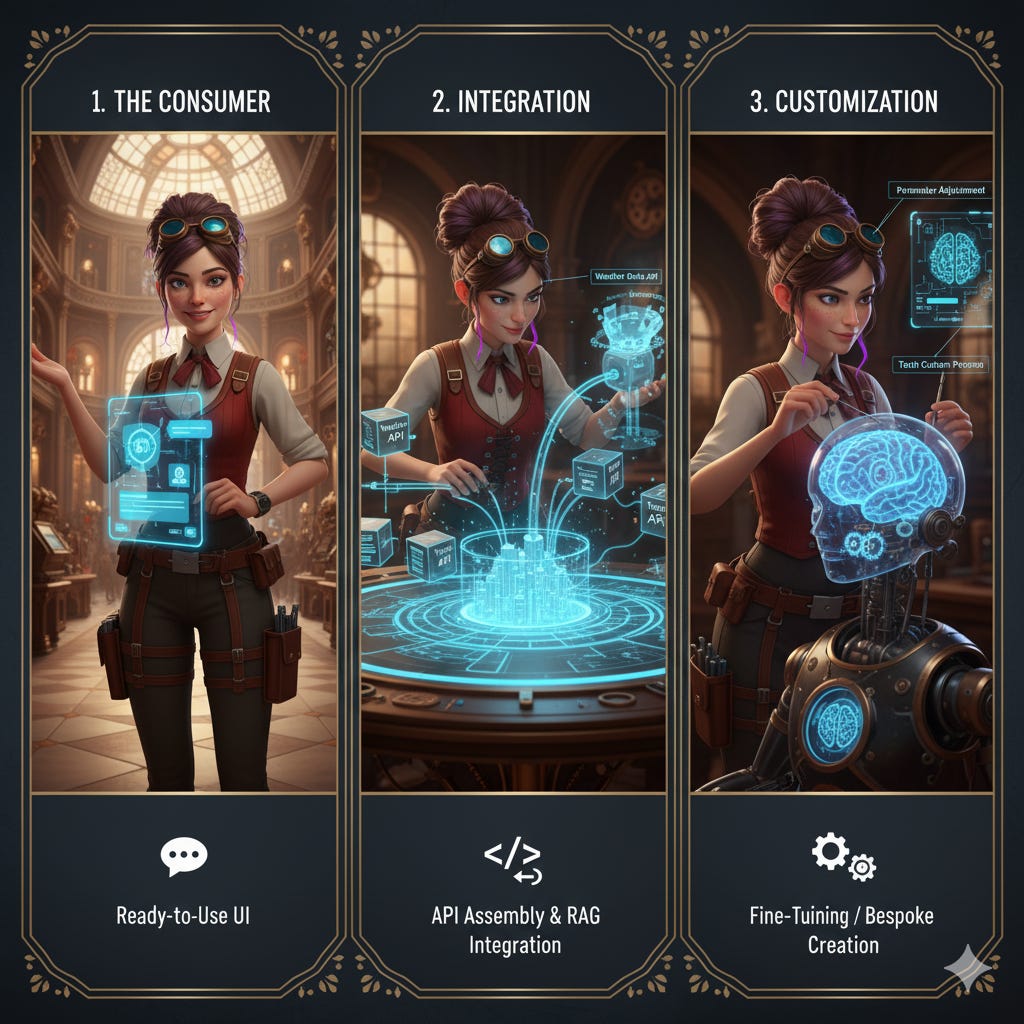
This post covers three levels of LLM use, based on access and implementation complexity:
- Consumer Use (Chat interfaces, no code required)
- Developer Integration (Building applications, APIs)
- Advanced Customization (Fine-tuning, specialized models)
Each level gives you different capabilities and requires different levels of technical expertise. Pick your starting point and level up when you’re ready and based on what you need.
1️⃣ Consumer Use: Chat and Built-In AI Features
Consumer Use covers any interaction with an LLM where you are not writing code. This includes standalone chat UIs and AI features baked into tools you already use.
At this level, AI acts as a personal assistant for everyday work: summarizing papers, drafting documents, testing code, brainstorming, and explaining hard topics. You get simplicity and speed, not deep control. Low-level knobs, complex orchestration, and app-grade memory are not included by default. Prebuilt, customizable assistants (like OpenAI’s custom GPTs and Google’s Gems) or Projects add a middle layer with custom instructions, file uploads, and basic tools. These work well for both rapid prototyping and production use cases where no-code setup meets your needs.
Who this is for: Everyone. Whether you’re exploring what AI can do, using it for daily work tasks, or building internal tools with custom assistants, this is where you start.
Understanding Model Providers
There are a number of companies that develop LLMs and many more that build on top of them. When evaluating LLM providers and models, consider three key dimensions:
- Model ownership: Model ownership: Proprietary models (like GPT, Claude) are closed-source and controlled by one company vs. open-source/open-weight models (like Llama, Mixtral) where the model weights are publicly released and can be downloaded and run by anyone under the license terms.
- Differentiation: What they’re known for in terms of cutting-edge capabilities, speed, cost, specialization
- Access: Managed services (provider handles infrastructure) vs. self-hosted (you manage servers)
Path A: Direct Model Provider Interfaces
In this path you use the model provider’s own flagship application, whether it is for text, images, or other modalities.
-
Access Method: Hosted services and apps by model provider. Managing all the tech, infrastructure, and updates.
-
What you can change: prompts and limited settings : model choice, temperature, JSON mode, file attachments, and built‑in tools where offered. No APIs.
-
Example providers (by category):
- Proprietary managed providers: OpenAI, Anthropic, Google, Perplexity, DeepSeek and others. Premium, multimodal models with enterprise reliability; usage is per token.
- Open‑source managed (hosted API, incl. speed‑optimized) providers: Together AI, Replicate, Anyscale, Groq, Fireworks. Access open‑weight models like Llama and Mixtral via API without running GPUs. Groq and Fireworks focus on very low latency.
- For visual, audio and video creation specifically: Video (proprietary): Sora, Veo, Runway, Luma. Image: Midjourney and DALL·E (proprietary), Stable Diffusion (open, self‑hostable). Audio (proprietary): ElevenLabs.
Each has its strengths and quirks and are always worth exploring and trying at different times.
Path B: 3rd Party Tool Interfaces
This path involves using wrappers that incorporate LLMs into a 3rd party tool. These tools control the integration for you, whether they are AI‑Native (AI is the core) or AI Augmented (AI added to an app). The difference is whether AI is leading the product focus or incorporated. Note all the tools and companies listed in Path A are AI‑Native. The differentiation in this section is 3rd parties can be AI‑Native and be a wrapper around someone else’s model like NightCafe wraps Stable Diffusion.
-
Access Method: Hosted Service. The tool provider (e.g., VS Code, Notion AI, Canva) manages the tech and the underlying model API calls for you.
-
What you can change: same as Path A: prompts and a few settings. You are selecting from a pre‑set menu, not programmatically managing the API call, cost, and infrastructure yourself.
-
AI‑Native Tools: Powerful applications built entirely around AI, like:
- Cursor: AI‑first code editor.
- NightCafe: AI art generator.
- Gamma: slides‑and‑docs generator.
- Descript: audio/video editor with transcript control.
-
AI Augmented: Simple helpers inside tools you already use, like:
- VS Code Copilot: in‑editor coding assistance.
- Slack AI: thread recaps and searchable answers.
- Shopify Magic: generates product descriptions and helps with store setup.
You will usually use prompts when using AI in both paths like:
- “Summarize this article in 3 bullet points.”
- “Explain what an AI transformer is in plain English.”
- “Write a professional email declining a meeting.”
- Upload an image, chart, or document and ask, “Summarize what you see in the attachment.”
Pro tip: Keep the prompts that work well, but remember that context, tools, and data matter just as much as wording.
Common gotcha: Do not expect perfection. LLMs hallucinate. They can confidently state wrong information. Always verify important facts, especially for medical, legal, or financial advice.
When to level up: Move beyond consumer use when you need to integrate LLM capabilities into applications, automate repetitive tasks like copying the same prompt 10X a day, or process large volumes of text that would be tedious to handle manually in a chat interface.
2️⃣ Developer Integration: Building with LLMs
The Developer Integration level is where you move from consumer to a creator. Instead of just chatting in a web UI, you use code (like Python or JavaScript) to call an LLM’s API. This programmatic access unlocks the ability to build AI directly into your own applications, automate complex internal workflows, or analyze data at scale.
Who this is for: Developers building applications, automating workflows, or integrating AI into products.
Common use cases at this level include:
- Embedded chat or Q&A interfaces: connect an existing model (via API) to your app, website, or internal system (no retraining required).
- Workflow automation: use APIs to classify, summarize, or trigger actions based on data from forms, emails, or tickets.
- Data analysis pipelines: call models programmatically to extract insights, structure text, or tag content at scale.
- Content and reporting tools: generate drafts, summaries, or recommendations automatically through your own product UI.
Moving beyond Consumer Use into Developer Integration and beyond brings new tradeoffs. Use this quick developmental checklist for awareness; each item deserves a deeper dive than this post covers.
- Cost: your first API bill can spike. Set billing alerts, monitor token usage, add caching and rate limits early.
- Lock-in: providers differ by API and behavior. Use thin abstractions and keep prompts portable.
- Model changes: hosted models evolve. Pin versions when possible and run regression tests. Self-hosting gives you version control.
- Security: defend against prompt injection, separate system and user roles, validate outputs.
- Data privacy: know where your data goes. Opt out of training or use enterprise plans; self-host for sensitive data.
- Evaluation and testing: measure if an LLM solution is actually working (evals, benchmarks, A/B testing)
As you dive into integration, you will make two choices: your Access Path (Hosted APIs or Self‑hosted models) and your Implementation Approaches. Implementation approaches in this section: Use As-Is with prompts and basic parameters, Context-Augmented Generation (CAG) with your data, and Production Optimization at serve time.
Path A: Hosted APIs (The “Managed” Path)
- Access Method: Hosted Service (via API)
- Provider options: Many of the same providers as in Consumer Use but you access them through different interfaces with code.
- Key Differentiator: Speed and reliability. You pay per token (where a token is roughly 4 characters or 3/4 of a word, so “Hello world” is about 2-3 tokens) for high uptime and zero maintenance.
- When to use: Production apps, startups, and anytime you need reliability and do not want to manage servers.
Quick start (Python):
# python
from openai import OpenAI

# Initialize the client with your API key
client = OpenAI(api_key=”your-api-key-here”)

# Send a message to the model
response = client.chat.completions.create(
    model=”gpt-4-turbo”,  # Specify which model to use
    messages=[{”role”: “user”, “content”: “Explain quantum computing”}]  # Your prompt
)

# Extract and print the response text
print(response.choices[0].message.content)
Path B: Self‑hosted Models (The “Full Control” Path)
- Access Method: Self‑hosted (on-prem or your cloud instance)
- Popular open models: Llama 4, Mistral, Gemma 3, Qwen 3, Phi‑4, Command R.
- Key Differentiators: Privacy and cost. Your data never leaves your network, you do not pay per token, you have the ability to modify model behavior and you can run as many queries as your hardware allows.
- Software that enables hosting: vLLM (high throughput server), TGI (production server with tokenizer and quantization support), Ollama (simple local runtime for quick tests), and LM Studio (desktop app for local experiments).
Transitioning from managed to self-hosted: If you start with a managed API provider (like Together, Replicate, or Fireworks), you can often move to self-hosting the same open model later. Generation settings like temperature, top_p, and max_tokens transfer directly to self-hosted runtimes like vLLM or TGI. However, infrastructure settings (tensor parallelism, KV cache size, quantization) depend on your specific hardware setup rather than what the managed provider used.
Quick Self-host Start (local with Ollama):
# bash
# Install Ollama (runs on your local machine)
curl -fsSL https://ollama.com/install.sh | sh

# Download and run a model - this starts a local server
ollama run llama4
Production deployment (OpenAI‑compatible endpoint):
#python
# 1. User asks a question
query = “What’s our refund policy?”

# 2. Search vector DB for relevant docs
relevant_docs = vector_db.search(query, top_k=3)

# 3. Build context-enhanced prompt
context = “\n”.join(doc.content for doc in relevant_docs)
prompt = f”Based on this context:\n{context}\n\nAnswer the question: {query}”

# 4. Send the enriched prompt to the LLM for response
response = llm.complete(prompt)
Access Method Decision Matrix:
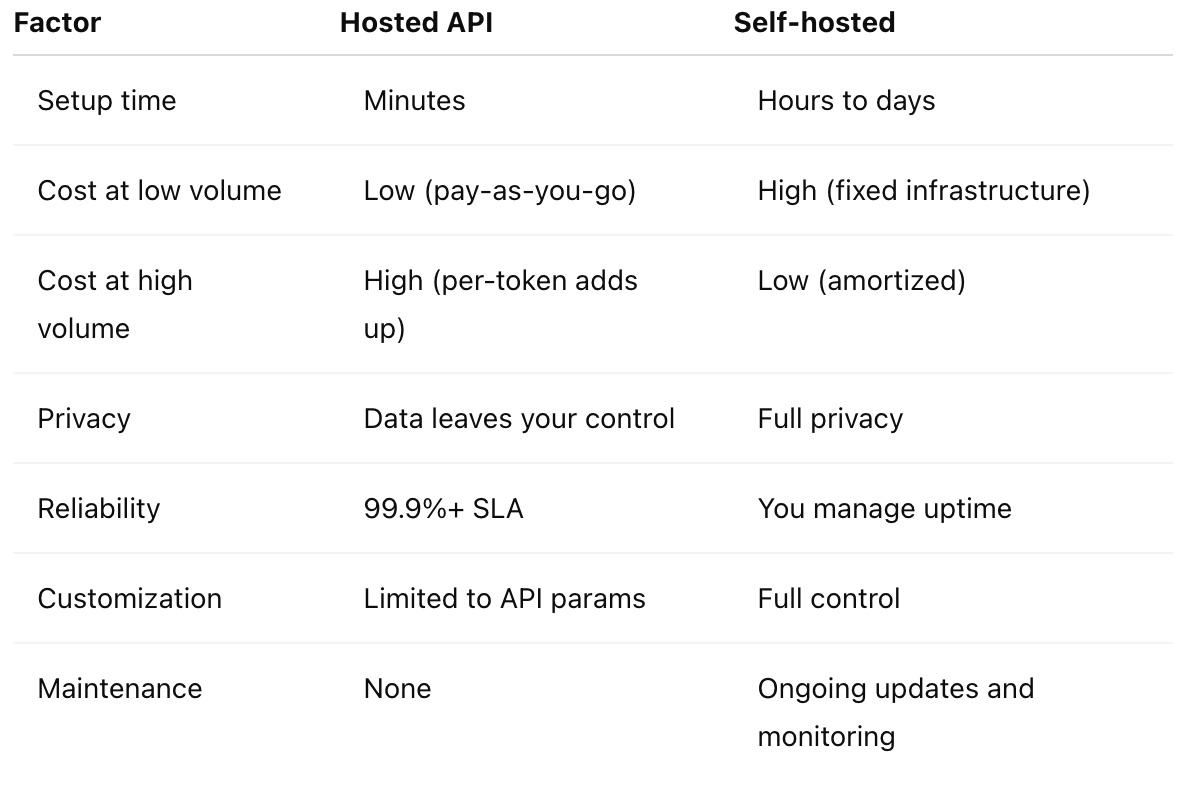
Below are the three Implementation Approaches you can apply regardless of which access path you choose.
Implementation Approach 1: Use As‑Is (Programmatically)
Call the model programmatically and get a response, like the chat UI but via code. Use this when the model’s general knowledge is enough. It’s mainly prompting plus basic parameters (temperature, max tokens).
Implementation Approach 2: Context‑Augmented Generation (CAG)
Context-Augmented Generation (CAG) is an umbrella term for techniques that enhance model responses by providing external context at inference time so it can answer with information that is current, accurate, and specific to your domain. This includes techniques like Retrieval Augmented Generation (RAG), tool calls, API calls, embeddings and metadata lookups, and lightweight database and memory access.
CAG (sometimes referred to as data‑augmented) is the practical bridge between simple prompting and full fine‑tuning. It lets you power search, Q&A, document understanding, knowledge bases, and setup workflow automation with your own content, without training a model from scratch. CAG can be built on top of either Path A (Hosted APIs) or Path B (self‑hosted Models).
Retrieval Augmented Generation (RAG) is the most common CAG pattern, so we’ll use it as our primary example. RAG pulls relevant documents or records and adds them to the prompt, giving the model grounded context without training anything new.
How RAG works:
- Store your documents (e.g., company wiki) in a vector database (Pinecone, Weaviate, ChromaDB).
- When a user asks a question, first search the database for relevant documents.
- Pass those documents to the LLM as context in the prompt.
- The LLM generates an answer grounded in those documents, and you can include citations.
When to use RAG:
- Answering questions about frequently updated information (product catalogs, news, documentation).
- Chatting with large knowledge bases that exceed the model’s context window.
- When you must cite your sources.
Real-world example: Glean is an enterprise AI platform that uses RAG to connect LLMs to company knowledge bases (wikis, documents, code repositories). When employees ask questions, Glean retrieves relevant documents with permission-aware search, then generates answers grounded in that context with citations:all without fine-tuning models on proprietary data.
Example flow (pseudo‑code):
#python
# 1. User asks a question
query = “What’s our refund policy?”

# 2. Search vector DB for relevant docs
relevant_docs = vector_db.search(query, top_k=3)

# 3. Build context-enhanced prompt
context = “\n”.join(doc.content for doc in relevant_docs)
prompt = f”Based on this context:\n{context}\n\nAnswer the question: {query}”

# 4. Send the enriched prompt to the LLM for response
response = llm.complete(prompt)
Implementation Approach 3: Production Optimization (Scaling What Works)
Once you have a working implementation (whether basic prompting or CAG), you may need to optimize for latency, cost, and reliability at scale. These patterns keep the model fixed and tune the serving layer (how you provide access to your model) to hit your targets. This isn’t about training this is about changing how requests are handled through routing, caching, fallbacks, and batching. Works with hosted, self‑hosted, and fine‑tuned models.
When to use: You have meaningful traffic volume, strict latency requirements, or need to reduce costs even after using CAG techniques.
Common patterns:
- Multi‑model routing: send simple requests to a small or cheaper model; route complex ones to a larger model based on request characteristics.
- Cascades and fallbacks: try a cheaper or faster model first; fall back to a more capable model on failure or low confidence.
- Caching: store and reuse responses for identical or similar prompts to cut API calls and improve latency.
- Batching: combine multiple requests into a single forward pass where feasible to increase throughput.
- Speculative decoding: draft with a fast model and verify with a stronger model to reduce latency.
- Distillation: train a smaller model on outputs from a larger one to reduce inference cost while maintaining quality.
- Guardrails and policy layers: add input and output filters, PII redaction, schema validation, and safety checks.
Example flow: request -> lightweight router -> small model first -> confidence check -> fall back to larger model if needed -> guardrail and cache.
These optimization techniques are part of MLOps and production ML practices. Depth and exact choices depend on your infrastructure and requirements.
When to level up: Move to advanced customization when RAG context is insufficient to enforce complex behaviors (like strict tool calling or niche reasoning), or when data sovereignty mandates private, air-gapped infrastructure. This stage is also critical for “distillation” where you are training smaller, faster models to mimic larger ones for cost and latency reduction.
3️⃣ Advanced Customization: Domain‑Specific AI
In Advanced Customization level, you move beyond using models and begin directly modifying them. Unlike RAG (which adds context outside the model), you are now changing the model’s internal weights and behavior through training on your data. This teaches the model domain‑specific language, alters its reasoning patterns, or makes it an expert in tasks it currently only understands generically. It offers maximum control and performance but requires ML expertise, specialized hardware (GPUs), high‑quality datasets and ongoing maintenance.
We will cover a few common paths for model customization, but this is a rapidly evolving space with many approaches. The paths below (fine-tuning and adapter training) are the most accessible for practitioners. Other advanced techniques exist such as continued pre-training on domain corpora, reinforcement learning from human feedback (RLHF), distillation, mixture-of-experts modifications, custom architecture development and building from scratch. These approaches require dedicated research teams and are not covered here.
Who this is for: ML engineers, researchers, and companies with specialized data needing models tailored to specific domains.
When to use: You still have quality gaps after CAG and prompts, or privacy and compliance require data sovereignty.
Common use cases:
- Style Enforcement: Legal document drafting with firm‑specific tone and formatting.
- Specialized Terminology: Medical notes and care plans using strict clinical shorthands.
- Niche Coding: Assistants for proprietary internal programming frameworks.
- Complex Reasoning: Any domain requiring 500+ training examples to demonstrate a pattern.
Path A: Fine‑Tuning (Hosted or self‑hosted)
Training the model on your domain‑specific data to deeply change its behavior and knowledge. Best for specialized terminology, consistent style, or tasks requiring deep domain expertise. You can fine‑tune through a hosted provider or run it yourself. Both change model weights to fit your domain; the difference is who runs the training and serving.
- Access: hosted service (API) or self‑hosted (your hardware or cloud)
- What you change: model weights. Hosted exposes data-level knobs and limited training params; self‑hosting gives full control of weights, hyperparameters, and infrastructure
- When to use hosted: you want a private model quickly, already use the vendor, or do not have an in‑house ML team
- When to use self‑hosted: you need strict privacy, custom training loops, or cost control at scale (on‑prem or cloud)
- Examples: hosted fine‑tuning via OpenAI or Vertex AI; self‑host with open models like Llama 4, Mistral, Gemma 3, Qwen 3, Phi‑4 using Axolotl, PEFT, or Unsloth.
Generic models are powerful, but sometimes you need a model that speaks your language and has your context like fine‑tuning LLaVA on your specific product images.
Path B: Adapter Training (LoRA/QLoRA)
LoRA/QLoRA are the fine-tuning approach that allows you to add lightweight, trainable layers on top of a frozen base model to change behavior with far less compute. Faster, cheaper, and easier to manage multiple specialized versions because you don’t have to retrain the whole model.
- Access: mostly Self-Hosted or via specialized tooling (e.g., Axolotl, Unsloth) but some vendors provide hosting.
- What you change: small “adapter” layers (can be <1% of total parameters) overlay the model while keeping the base model weights frozen (adding a color filter).
- When to use: small to mid‑size datasets, multiple variants per customer, tight budgets or VRAM
- Best for: Customizing style, tone, format, or specific domain tasks without managing massive infrastructure.
Advanced Implementation Notes:
- For runtime and serving‑time tuning at scale, use Implementation Lever 3: Production Optimization.
- Data is the Bottleneck: You can ship useful behavior with RAG without new data. But to fine-tune (Path A or B), you need a dataset. Start with high-quality, human-verified examples (Input → Desired Output). If you feed a model bad data, you get a bad model faster and with more confidence.
- Licensing: Always confirm you have the right to train on your data, and check the base model’s license (e.g., Llama 3, Mistral, Gemma) regarding fine-tuning and redistribution.
At the Advanced Customization level, you transition from an AI integrator to an AI architect. You learn to master the full ML lifecycle, from preparing custom datasets and setting hyperparameters to optimizing models for production and evaluating their performance against your specific business goals.
🗺️ Choosing Your Path
Not sure which level fits your needs? Here is a quick guide:
- Just exploring or prototyping ideas? → Start with Consumer Use (ChatGPT/Claude). No setup, immediate results.
- Building a product or automating workflows? → Move to Developer Integration. Start with hosted APIs, consider self‑hosting for scale.
- Have domain‑specific terminology or behavior needs? → Try RAG first (Implementation Lever 2), then move to fine‑tuning only if RAG is not enough.
- Need maximum privacy or have very high volume? → self‑hosted from the start (Developer Integration or Advanced Customization). The upfront investment can pay off quickly.
- Your monthly API bill consistently exceeds $5,000–$10,000? → Seriously evaluate self-hosting economics. The break-even point varies by use case, but at this volume the infrastructure investment often pays for itself within months.
The most successful LLM implementations follow this path:
- Explore with UI (days): understand capabilities, test ideas.
- Prototype with hosted API (weeks): build MVP, validate the use case.
- Add RAG if needed (weeks): incorporate your data without training.
- Optimize costs (months): self‑host if volume justifies it.
- Fine‑tune if necessary (months): only when generic models fall short.
Each level teaches you what you actually need from the next one.
Popular models at a glance
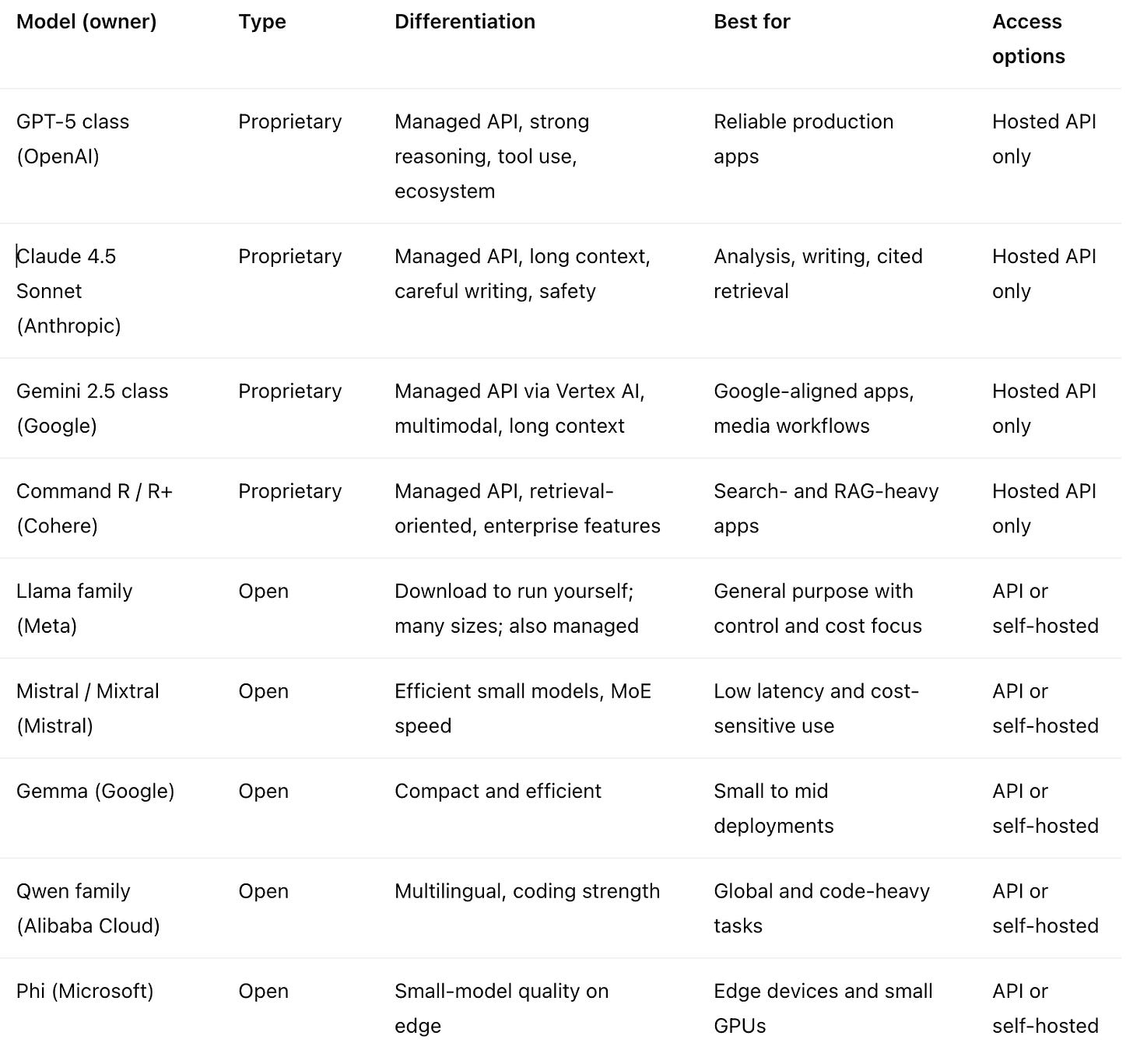
Proprietary models are API‑only. Open models can run on your infrastructure, or you can access them through managed APIs (Together, Replicate, Fireworks, Groq, AWS Bedrock, Azure AI Model Catalog, Google Vertex AI, Hugging Face Inference Endpoints, etc.).
🚀 Takeaway
The best model is the one you will actually ship. Start simple, iterate quickly, and do not let perfect be the enemy of good.
Remember that this landscape is always changing. Stay curious and keep experimenting. Do not blindly trust any single approach or provider. Test alternatives, challenge assumptions, and be willing to take calculated risks. What seems cutting‑edge now might be obsolete in six months, and what seems impossible today might be routine next year.
Mastering AI is not about picking the right tool early. It is about staying flexible, continuously learning, and adapting and switching approaches when something better emerges.
📚 Next Steps
Learn more:
- Hugging Face Docs: Comprehensive guides for open models
- Anthropic Cookbook: Practical recipes for Claude
- r/LocalLLaMA: Community wisdom on self‑hosting
- What is LLM Fine-Tuning: Checkout other posts I’ve done on this subject
Practice:
- Pick a personal use case (summarizing articles, drafting emails, analyzing data)
- Try it at your current level, then push to the next level
- Build something small but useful: learning by doing beats reading theory
The community is vast, welcoming, and evolving daily. Jump in.
$ cd /posts/ — all posts