10 minutes
LLM Fine-Tuning & Performance Tug-of-War
Originally published on Substack, Oct 14, 2025
This year has been a crash course in large language model (LLM) development, marked by long training runs, GPU juggling, and a constant cycle of trial and error. While there is a lot of excitement around building custom LLMs, you probably know you shouldn’t start from scratch. Fine-tuning is the process of teaching an existing model (e.g. GPT-NeoX, Llama, Gemma, etc.) new knowledge or behaviors which transforms a general-purpose LLM into one that is a domain specialist. It bridges the gap between broad capability and domain-specific precision, allowing teams to achieve superior results without the immense cost of training from scratch.
The reality of fine-tuning is less about magic and more about the strategic tug-of-war between quality, speed, and memory. The secret to success lies in identifying which of these factors matters most for your goals.
Everyone wants high quality LLMs and yet, there are many use cases where speed and memory will require you to lower quality expectations. The LLM world is in constant flux. The open-weight model you download today might train differently next week, while shifts in GPU availability can make or break a project. Fortunately, what once required massive compute clusters can now often be accomplished on a handful of rented A100s if you can find them and if you understand how to apply what matters to the model configurations. Here are core learnings from my experiences when working to strike the right fine-tuning balance to get the job done.

⚖️ The Three Forces of Optimization
When configuring your hardware and LLM for fine-tuning, these three forces will continually demand trade-offs.
🎯 Quality
The ultimate goal is a model that performs brilliantly on your task. This means better reasoning, richer responses, fewer hallucinations, and stronger domain understanding. But higher precision comes at a cost with more compute, longer runs, and stricter hardware demands. In one experiment, I doubled my model’s reasoning accuracy with longer context but alone, it quadrupled training time.
⚡ Speed
Faster training means shorter feedback loops and lower GPU bills. When I was iterating daily on domain-specific tasks, speed beat perfection every time. A slightly less accurate model you can ship this week often wins over a “perfect” one you can’t afford to finish.
💾 Memory
VRAM is your hard ceiling. It dictates what you can run, not what you want to. A 7B model (the “B” refers to billions of trainable weights / essentially the model’s “brain size”) might fit comfortably, but stretch to 70B and you’re dealing with memory pressure that leads to crashes, failed runs and wasted time. This is where you start wrangling optimizer states, PEFT methods, and every byte of GPU memory you can reclaim.
You can’t maximize all three. Every setup is a compromise . Define what “good enough” means for your use case before you start tuning.
🗺️ Define Your Optimization Strategy
To strike the right balance, you first need to define your optimization strategy. You need to know what is your goal which will be based off of your use case and what are your budget and hardware limits. Even if you have the budget sometimes you can’t access the hardware.
1. Priorities Shift by Context
While we all want a top-tier quality model, your business case should shape your goals and priorities. This tug-of-war isn’t abstract; it directly impacts outcomes. These are some key example scenarios that influence priority.
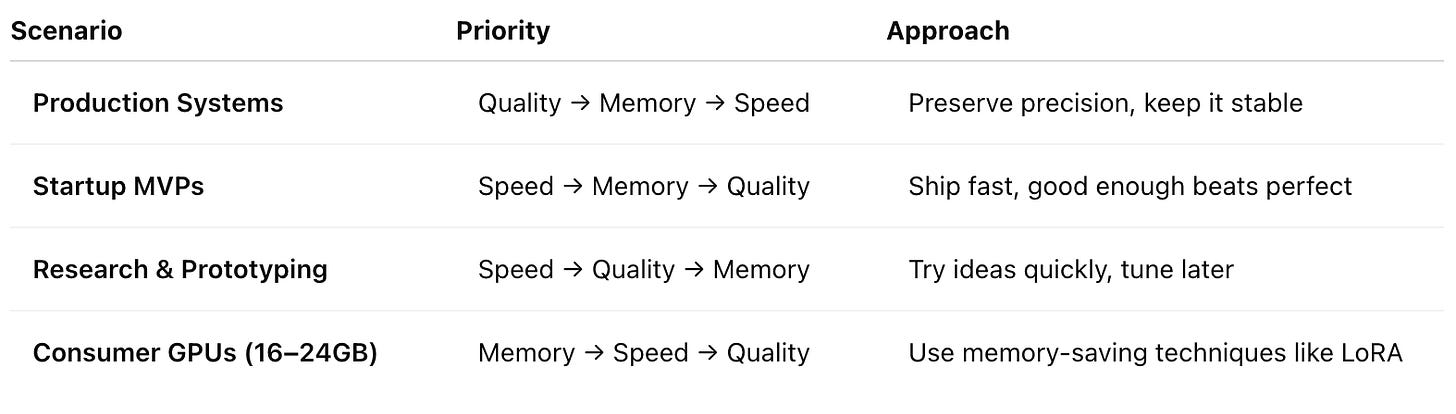
Are you proving a concept or deploying a critical service? Your optimization strategy should match your mission. In startups, speed wins. In enterprise systems, reliability wins. Of course, these aren’t rigid rules. A startup whose core product is its model may prioritize quality above all. The point is that defining your priorities clarifies your entire development approach
2. Know Your Limits: Hardware and Budget
What also helps define the starting optimization strategy is knowing your budget and hardware limits. Every additional training hour burns cash.
Hardware Reality Check: An NVIDIA A100 (80GB VRAM) or H100 (80GB VRAM) GPU gives you a large arena to play in. A consumer card with 16-24GB VRAM is a much tighter space. An H100 might be ~3-8x or more faster than an A100 (depending on workload), but it can also cost 2-3x more.
Why Memory is the Bottleneck: To understand the memory pressure, consider a 70B parameter (trainable weights) model needs over 140GB of VRAM. The rule of thumb is that at a standard 16-bit precision, each weight consumes 2 bytes of memory (70B x 2 bytes = 140GB). During fine-tuning, you also need to store gradients which can double that footprint. And this doesn’t even account for optimizer states, activations, or the data itself which all need the same limited pool of VRAM. This is why memory optimization techniques are central to this tug-of-war to give you tools for fine-tuning.
Granted one of the biggest challenges out there is getting access to GPUs. So even if you have the money to spend sometimes time is limited just because of access.
🧩 Core Config Levers/Parameters for Fine-Tuning
Once your goals and limits are defined, they help guide how you configure fine-tuning for your domain specific AI. When you fine-tune, you will modify a long list of parameters in a configuration file (typically YAML or JSON), to tailor a base model to your needs. There is a wide range of open-source models to use as a foundation, including DBRX, Qwen, and the Mistral family.
These configuration settings directly influence model performance, shaping how it learns and responds. The real craft lies in systematically tuning them to strike the right balance between quality, speed, and efficiency.
Below are four core configuration levers to give you a place to start on finding that balance. This is a small sample of the many parameters you can eventually explore.
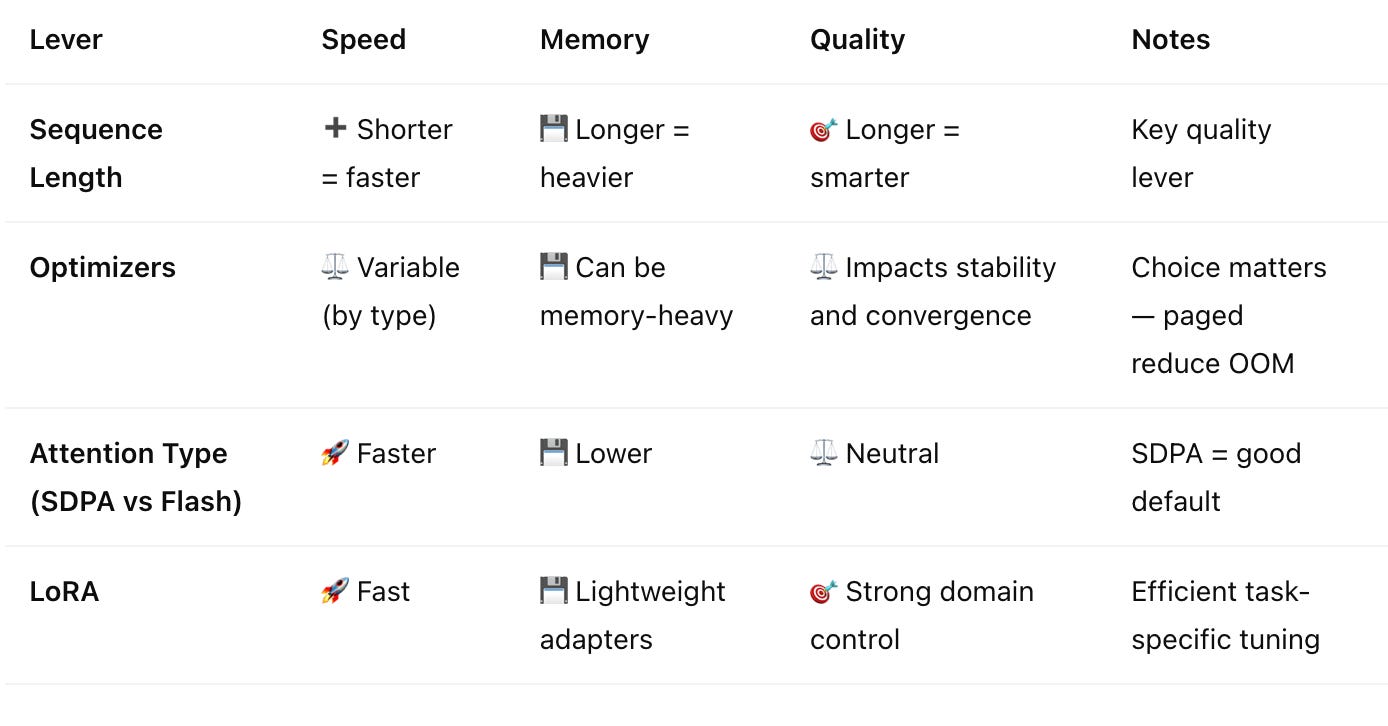
1. Sequence Length: The Context King
The sequence length, or context window, is how much text the model can “see” at once. It’s like your own working memory and its crucial for LLMs and preserving quality.
- The Challenge: Memory usage can grow quadratically with sequence length alone. Doubling your context from 4K to 8K tokens can quadruple the memory required. This is where memory budgets go to die.
- Usage:
8192(8K) is a great target for most LLM fine-tuning tasks, as it handles long conversations and documents well. Drop to4096(4K) if you’re memory-constrained. Only use2048as a last resort.
2. Optimizers: The Engine of Learning
Optimizers are the algorithms that drive training by getting the model to fit the problem. They update the model’s weights based on the loss function and determine how fast and efficiently your model learns. For instance, think of it as the GPS navigation for your model’s learning process; some routes are faster, some are more scenic (stable), and some use less fuel (memory). They’re central to managing the balance between quality, speed, and memory.
- Quality: A well‑chosen optimizer helps the model converge smoothly and generalize better. AdamW (Adam with Weight Decay) is the default workhorse for reliability and preserving quality across runs.
- Speed: Some optimizers, like Lion or newer fused variants, can converge faster by simplifying gradient updates, reducing total training time.
- Memory: Optimizer states often take up as much memory as the model weights themselves. Memory‑efficient versions like PagedAdamW or its 8‑bit variant offload or compress these states, freeing VRAM without heavily sacrificing stability.
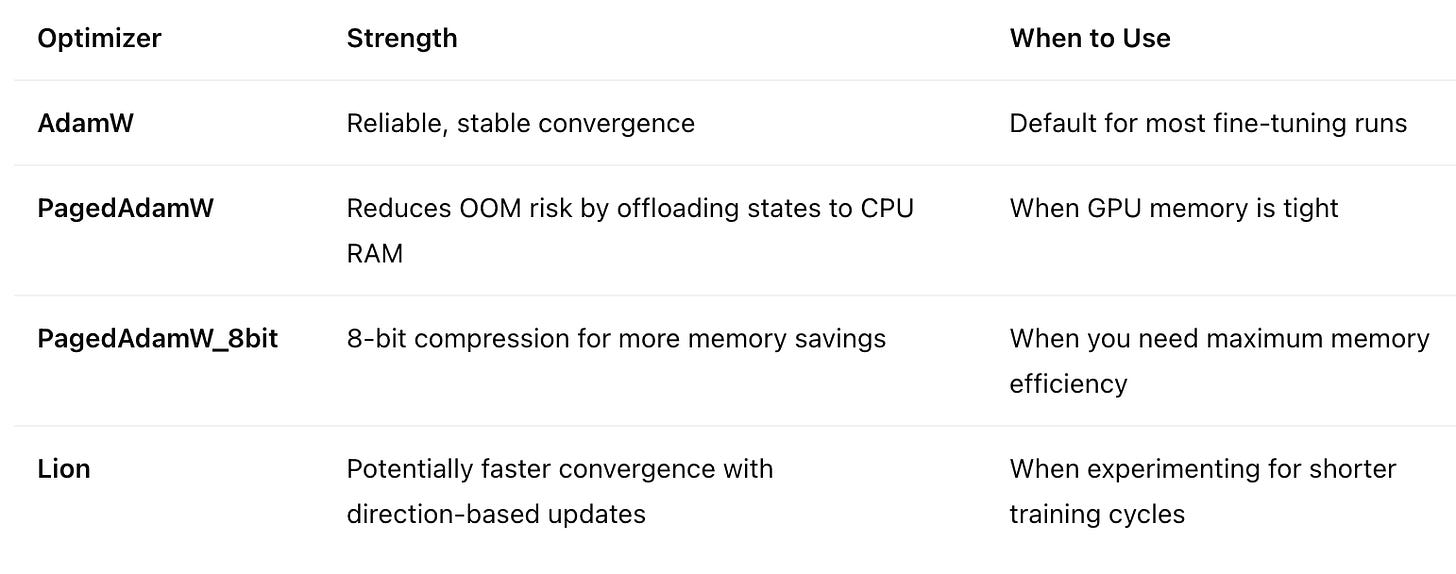
Recommendation: Start with AdamW for quality and consistency. Shift to paged or 8‑bit versions when memory becomes your bottleneck, or experiment with Lion if you’re chasing faster iteration cycles. Note there are many more options you can explore for optimizers. AdamW alone has many variants to explore.
3. Attention Mechanisms: The Efficiency Engine
Attention lets a model weigh the importance of different words, but it’s a computational beast whose cost grows quadratically with sequence length. This makes it a primary bottleneck for both speed and memory.
Some key attention types you can use have different impacts on our tug-of-war. Think of it like painting a wall: eager attention mixes all the paint in one massive vat (predictable but wasteful), SDPA sprays efficiently as it goes, and Flash Attention is the ultra-fast sprayer that sometimes sputters under pressure.
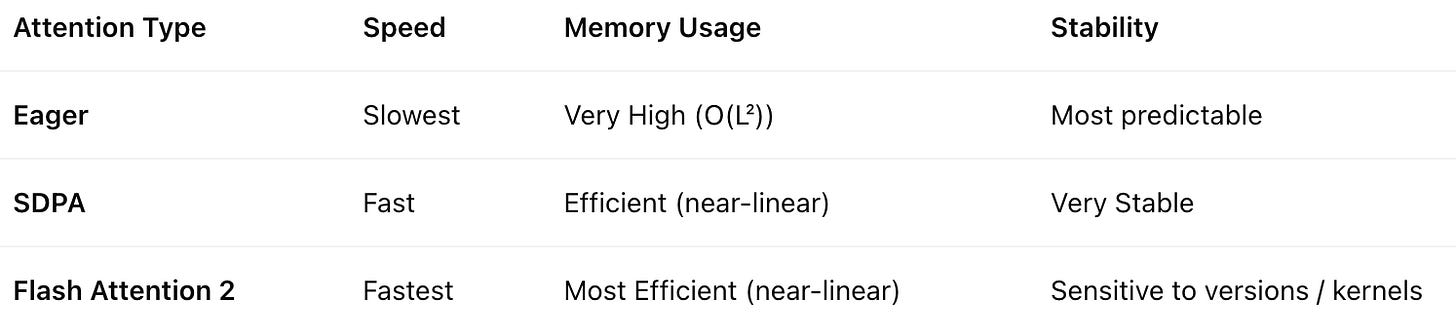
Recommendation: Use attn_implementation: “sdpa” as your default. It provides a fantastic balance of speed and stability. Only try flash_attention_2 if you need maximum performance and are willing to risk instability.
4. LoRA (Low-Rank Adaptation): The Smart Shortcut
Instead of retraining billions of model weights, LoRA freezes the original weights and inserts small, trainable “adapter” layers. This is a form of Parameter-Efficient Fine-Tuning (PEFT) that dramatically reduces VRAM usage and training time. You only need to train a tiny fraction of the adapter weights. Think of it like adding a thin corrective “lens” over the original model to adapt its behavior without costly, memory-intensive changes.
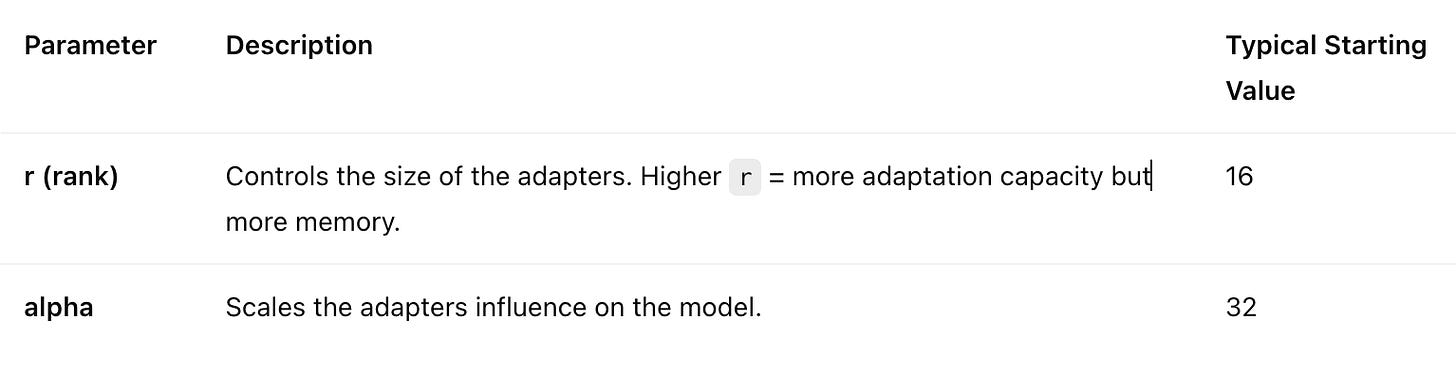
Adjustment: If the model is underfitting, increase r to 32 or 64. If it’s overfitting or you need to save memory, decrease r to 8. A common rule of thumb is to set lora_alpha to be twice the lora_rank(e.g., lora_rank: 16, lora_alpha: 32). This scaling factor can improve performance.
Recommendation: Start with lora_rank: 16, lora_alpha: 32. Using LoRA is the standard approach due to its efficiency. Only consider disabling it for a full fine-tune if you have access to extensive GPU compute.
🧪 Practical Workflow to Start Fine-Tuning
When you first tackle fine-tuning, think in clear stages that take you from strategy to execution.
Step 1 Choose a Starting Configuration:
- High-End Setup (A100/H100 or multi‑GPU, large budget): Prioritize quality. Start with full precision, a long sequence length (8K), and a stable optimizer like
adamw. - Mid-Range Setup (Single GPU, moderate budget): Be smarter from the start. Use a balanced approach that saves memory without sacrificing too much quality, like using an 8-bit paged optimizer from the start.
- Budget/Consumer Setup (Limited VRAM): Be aggressive on memory. Start with a shorter sequence length (4K) and employ more PEFT methods, and other memory-saving techniques.
Step 2 Establish a Stable Baseline and Iterate: Here is an example quality-first baseline config with the parameters we covered.
# A good starting point can be
seq_length: 8192                 # Generous context
optimizer: “adamw”               # Full precision
attn_implementation: “sdpa”      # Memory efficient
lora_enabled: true               # Efficient fine-tuning
lora_rank: 16                    # Starting point
Step 3 Assess and Optimize Progressively Run a few training steps with your baseline and watch your VRAM usage with nvidia-smi. If you hit Out-Of-Memory (OOM) errors, apply optimizations in this order:
- First Tweak: Switch to an 8-bit optimizer: paged_adamw_8bit. This saves significant memory with minimal impact on quality.
- When Needed: If you’re still hitting a wall, enable model quantization: load_in_8bit: true. We haven’t covered quantization above but that is also a powerful config that can help with optimization.
Even when memory or speed are top priorities, you still want to max quality that fits within your VRAM, not to minimize memory usage for its own sake.
🔍 Final Thoughts
Fine-tuning isn’t about brute force; it’s about finding an intelligent equilibrium between quality, speed, and memory that aligns with your goals and constraints. Quality, while paramount, does not always win the tug-of-war against the practical needs of speed and budget.
What I’ve learned is that success in LLM fine-tuning optimization comes from respecting your limits while creatively pushing against them. I’ve covered some fundamental parameters to get you started with fine-tuning. I encourage you to dig deeper into the various levers you can pull. The tools will change, but thoughtful experimentation will always win. Don’t chase perfection; chase what works.
With foundation models improving so quickly, also always ask whether building your own is worth it. If you do, make sure the long‑term value outweighs the cost, especially if your product depends on owning that model.
$ cd /posts/ — all posts