12 minutes
YouTube-8M Dataset
Originally published on Medium, Mar 11, 2020
Computer Vision | Video Understanding

YouTube-8M is a project that was developed by Google AI/Research in 2016 to drive innovations and advancement in computer vision, representation learning and video modeling architectures at a large scale.
I’ve been exploring this dataset and example code for a couple weeks and this post summarizes the dataset origin, structure and where to find it. I also share initial exploratory steps that are posted in many places on Kaggle.
Dataset | Project History
The research team originally curated 8 million YouTube videos (500K hours) and 4.8K (average 3.4 labels / video) visual titles for the dataset in 2016. Part of the reason they started this project was to help address the problem of lack of large-scale, labeled datasets by giving public access to this curated dataset and precomputed features.
A key goal of this project is to eliminate storage and computation barriers to help accelerate research on large scale video understanding. Similar to how ImageNet enabled continued breakthroughs in machine learning especially in computer vision by creating a large scale image dataset and enabling access for researchers. The YouTube-8M team published their initial research, YouTube-8M: A Large-Scale Video Classification Benchmark, in Sep 27, 2016.
The research team has run 3 Kaggle challenges off the dataset and 3 workshops over the last four years. Each Kaggle challenge had a different focus as noted below.
- 1st Competition | Develop classification algorithms which accurately assign video-level labels. The goal was to advance video-level annotations with unconstrained models.
- 2nd Competition | Learning video representations under budget constraints by creating a compact video classification model with a model size below 1GB. The goal was to advance video-level annotations with constrained models.
- 3rd Competition | Find and share specific video moments known as temporal concept localization. Localize video-level labels to the precise time in the video where the label actually appears and do this at an unprecedented scale.
Dataset Structure
The YouTube-8M data has gone through a few different iterations. The dataset was built off of videos and labels publicly available on YouTube. The dataset has been adjusted and morphed over the last four years and the original 8 million video dataset has been deprecated. The current available datasets are:
- Videos = 6.1M videos, 3862 classes, 3.0 labels / video, 2.6B audio-visual features
- Video segments = 230K human-verified segment labels, 1000 classes, average 5 segments/video
The dataset referenced on the YouTube-8M website is the latest and focuses on video segments. So it uses part of the video dataset and narrows the focus to 1000 classes for the segments in those videos.
Feature Compression
The actual structure of how the data is stored is in compressed protobuf files that are using the TensorFlow version of these types of file structures in tensorflow.Example and tensorflow.SequenceExample. Each video is stored in one of these types of objects and then grouped into TFRecords.
Compression was needed to make it easier to develop a model because the raw dataset is hundreds of terabytes considering the original 8 million is over 500K hours of video. For the frame-level features, the entire video fame image (one per second with up to the first 360 seconds per video) was pre-processed with the publicly available Inception network that was originally trained on ImageNet. This reduced dimensionality to 2048 features per frame and pulled motion out of the video in essence making it a still video. Research has show motion features have diminishing returns as the size and diversity of the video data increases. PCA with whitening was also applied to reduce to 1024 features per frame. Finally, the data was compressed from 32-bit to 8-bit data types. More information can be found in the paper YT-8m: A Large-Scale Video Classification Benchmark.
tensorflow.Example | tensorflow.SequenceExample
The tensorflow.Example structure is a compact data format containing key-value store features where each key, which is a string, maps to a value. This is a packed byte, float or int64 list. It’s a way to standardize an open data format that is flexible to define the configuration when writing and reading from it. This is basically TensorFlow’s approach to protocol buffers (protobuf) to make it easy to store and share unstructured data. So you define what the key is and its related values. Visuals are unstructured data and need this type of storage mechanism.
The tensorflow.SequenceExample represents one or more sequences and some context that applies to the entire example. The real difference between the two is that SequenceExample has a FeatureList that represents values of a feature over time which is equivalent to over frames.
Due to the dimensional reduction transformation of the video, you are not able to translate back to its original form, but labels exist to help verify results.
TFRecord
TFRecord is a simple format that stores binary records or another way to say it is it’s a datatype created by the TensorFlow project to serialize data and enable reading it linearly. The .tfrecord files store a couple hundred tensorflow.Example or tensorflow.SequenceExample objects that are 100–200MB each.
Feature Types
There are 2 versions of the features: frame-level and video-level. Video-level features are features like audio and rgb features averaged per video which is fewer than specific audio and rgb features per frame.
This dataset comes with pre-extracted audio and visual features from every second of video (3.2B feature vectors in total). If you want to extract your own features, you can do that using the MediaPipe GitHub repo to help or create your own feature extractor. This is valuable when you want to apply this to a new dataset or explore features that haven’t been used yet.
Frame-level Training Data
The frame-level dataset is stored as tensorflow.SequenceExample object and grouped into a total of 3,844 TFRecords. Each record holds around 287 videos. This is what is used for segment related analysis. The total size is around 1.53TB (estimated about 1.1M videos) and has the following structure:
- id: unique YouTube video id. Train includes unique actual values and test/validation are anonymized
- labels: list of labels for that video
- rgb: 1024 8 bit quantized video rgb features
- audio: 128 8 bit quantized audio features from the video
Note, quantized is technique to constrain input from large set of values to a smaller / discrete set and 8 bit quantized is a popular approach to use with neural nets because it places limits on the data range which in essence compresses. This continues to make training the net faster while maintaining the ability for the model to find valuable information in the compressed information.
Note after all the work to compress the data and features, the frame-level training data is still 1.5TB total. If you decide to download this to work on it on your machine, make sure you have enough disk space.
Video-level Training Data
The video-level dataset that provides video-level features is stored as a tensorflow.Example object grouped into a total of 7,689 TFRecords. The total size is around 31GB. It has the following structure:
- id: unique YouTube video id. Train includes unique actual values and test/validation are anonymized
- labels: list of labels for that video
- mean_rgb: average of video rgb features as float array of length 1024
- mean_audio: average of audio features as float array of length 128
This dataset is not referenced in the starter code example for generating segment level labels and predictions. Still you can see if you want to explore and utilize in other ways.
Validate & Test Data
A subset of the earlier validation set of videos is now provided with segment-level labels. This dataset listed below is the newest one and is used for the segment related analysis. There are 3,845 TFRecords for validation and for testing (a total of 7,690 TFRecords) that contain tensorflow.SequenceExample objects. That total size of the data is about 24GB.
In addition to the Frame-level structure above (id, labels, rgb, audio), the objects also include the following structure:
- segment_start_times: list of segment start times
- segment_end_times: list of segment end times
- segment_labels: list of segment labels
- segment_scores: list of binary values indicating positive or negative corresponding to the segment labels
Note, each segment-level data point is 5 seconds long.
Vocabulary
The vocabulary.csv is a data dictionary for the label ids mapped to label names and other relevant details for the video classifications. Basically, all the actual labels in the data examples and model predicted outputs are numbers and this is your decoder ring for what those numbers mean. There are 1000 classifications in the segment focused vocabulary file and it has the following structure:
- Index: label ids
- TrainVideoCount: number of training videos for that name
- KnowledgeGraphId: knowledge graph id for the labels position
- Name: classification name like concert, car, food
- WikiUrl: Wiki link for more information about the name
- Vertical1: categorization
- Vertical2: additional categorization
- Vertical3: additional categorization
- WikiDescription: Wiki description of the name (as it says)
Where to find the Data
For each data group listed above, the respective places you can access this data as of the date of this post are listed below:
Frame-level Training Data
- YouTube-8M site
- Or use the download script to download the dataset
curl data.yt8m.org/download.py | partition=2/frame/train mirror=us python
- Or link to it on Google Cloud Storage
gs://us.data.yt8m.org/2/frame/train
Video-level Training Data
- YouTube-8M site
- Or use the download script to download the dataset
curl data.yt8m.org/download.py | partition=2/frame/train mirror=us python
- Or link to it on Google Cloud Storage
gs://us.data.yt8m.org/2/video/train
- Note the above GCS link includes train and validate data
Validate & Test Data
- Link to it on Google Cloud Storage
validate files at gs://us.data.yt8m.org/3/frame/validate
test files at gs://us.data.yt8m.org/3/frame/test
- Or download using the Python script YouTube-8M provides
curl data.yt8m.org/download.py | partition=3/frame/validate mirror=us python
curl data.yt8m.org/download.py | partition=3/frame/test mirror=us python
Vocabulary
You can find the original vocabulary with all 3,862 classifications at this link. This can be helpful if you explore the features and find labels that don’t have matching names.
Exploring Data
Even though the site and Kaggle describe the data structure, I like to look at the data and usually use something like Jupyter Notebooks to load it and explore. The following are snippets of how I explored the data in a notebook.
First load the libraries you need
import tensorflow as tf
import pandas as pd
from IPython.display import YouTubeVideo
from google.cloud import storage, exceptions
Note, I’m using TensorFlow 1.14 for this example because the code below is based off that version. You’ll get a lot of warnings when you run TensorFlow. A next goal would be to upgrade this code to the latest version of TF.
Video File
Create a variable that points to the file you want to load.
record = "[PATH TO FILE]/train00.tfrecord"
Note you need to replace [PATH TO FILE] with where your file is located
Create variables that to hold different parts of the TFRecord data.
vid_ids = []
labels = []
rgb = []
audio = []
To load the all the examples in the TFRecord file, use the following iterator.
for example in tf.compat.v1.python_io.tf_record_iterator(record):
    seq_example = tf.train.Example.FromString(example)
    vid_ids.append(seq_example.features.feature['id']
                   .bytes_list.value[0].decode(encoding='UTF-8'))
    labels.append(seq_example.features.feature['labels']
                   .int64_list.value)
    rgb.append(seq_example.features.feature['mean_rgb']
                   .float_list.value)
    audio.append(seq_example.features.feature['mean_audio']
                   .float_list.value)
Take a look at how many videos are in the record and pick a video id.
print('Number of videos in this tfrecord: ',len(vid_ids))
print ('Number of labels in this tfrecord: ', len (labels))
print('Picking a youtube video id:',vid_ids[15])
Which returns the following result:
Number of videos in this tfrecord:  287
Number of labels in this tfrecord:  287
Picking a youtube video id: 54hQ
As mentioned, there are 287 videos or tensorflow.SequenceExamples per TFRecord.
You’ll notice it’s not clear what the video ids mean since they have been anonymized.
print(vid_ids)
['op00',
 'O900',
 'Oq00',
 'Li00',
 '1300',
 'gG00',
 'xI00'
....
I’ve found there is a place to translate this id for a few of the examples and you can use the following.
curl http://data.yt8m.org/2/j/i/op/op00.js
It returned a page with this mapping of the video id in the file to the YouTube video id.
i("op00","FBQ00Vk7Obs");
This shows how the ids in the example objects map back to a YouTube video. I’ve done some exploring and making that url request works with a few file video ids but not most. It definitely works with train00.tfrecord or train0000.tfrecord files.
With the above id translated to one that is an actual YouTube id, you can look up the YouTube video id directly on YouTube. You can also enter the following Python command in your code to get it to load the video in the notebook.
YouTubeVideo(‘FBQ00Vk7Obs’)
And voila…

This is the only way I’ve found to see the original video content and it only works for a very small grouping of files. For most, you will have to trust in the actual category that is assigned to the video to get sense of what is in it.
Vocabulary File
The vocabulary.csv file holds the video categories and additional details so you can see what model results translate into. To review the contents of this file, download and use Pandas to load the file into a DataFrame object.
vocabulary = pd.read_csv(‘[PATH TO FILE]/vocabulary.csv’)
Note, replace [PATH TO FILE] with where this file is stored
Take a look at the columns and the first few rows to get a sense of the data.
vocabulary.head()
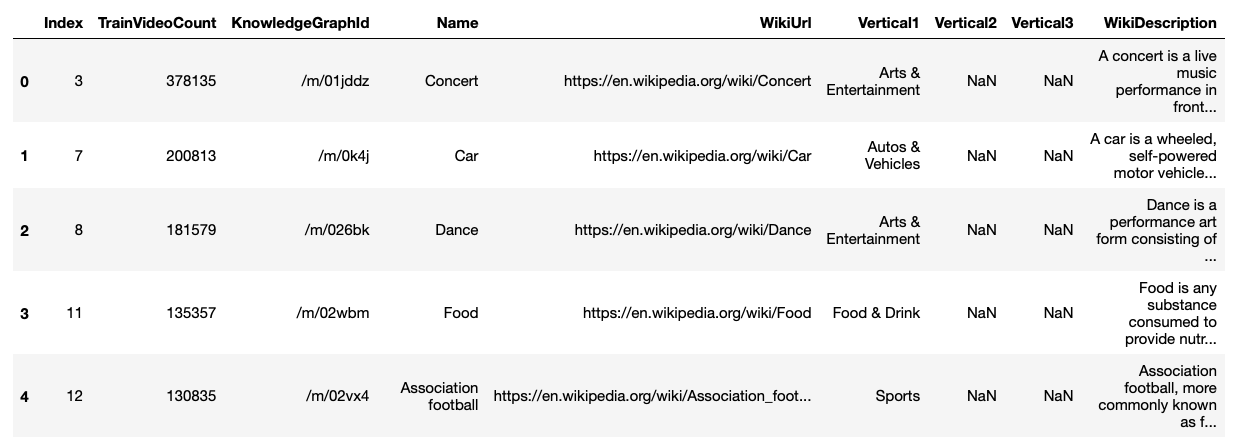
Also get a summary of the DataFrame information.
vocabulary.info()
Which gives the following info for the 1000 size categories.
<class 'pandas.core.frame.DataFrame'>
RangeIndex: 1000 entries, 0 to 999
Data columns (total 9 columns):
 #   Column            Non-Null Count  Dtype
---  ------            --------------  -----
 0   Index             1000 non-null   int64
 1   TrainVideoCount   1000 non-null   int64
 2   KnowledgeGraphId  1000 non-null   object
 3   Name              988 non-null    object
 4   WikiUrl           988 non-null    object
 5   Vertical1         1000 non-null   object
 6   Vertical2         153 non-null    object
 7   Vertical3         12 non-null     object
 8   WikiDescription   988 non-null    object
dtypes: int64(2), object(7)
memory usage: 70.4+ KB
You’ll see that Name has some null values that are curious but the Vertical1 still has data for all rows. Consider finding a way to fill in the Name column with Vertical1. Also Vertical2 and Vertical3 have so many null values they may not matter much. Take a look at what is there and see if there is any value that will help in understanding the video files. Consider dropping those columns if they don’t add much more information.
And describe the file.
vocabulary.describe()
This gives a count and general stats for each numeric column.
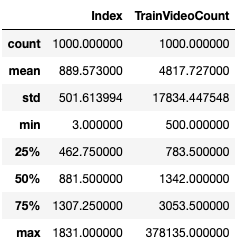
As part of preparing to work with data, its good to load it up, futz with it and ask questions so you can better understand what you are working with. This is only scratching the surface of exploring the data and there are many other examples out there.
Wrap Up
This post provides an overview of the YouTube-8M dataset. It’s a video dataset that was built by the Google Research team to advance computer vision at scale, and it uses publicly available YouTube videos. The post went over the origin of the dataset, details on the structure and where to find it. Also, we went through some initial exploration of the data itself so you can better understand what you have to work with.
Next steps are to train some models with the existing data features that have already been generated in this dataset and run some predictions.
$ cd /posts/ — all posts